Search Console Client Action Kit / local software
Google Search Console analysis.
Clear client actions.
A CSV analysis tool for SEO consultants. Compare Google Search Console exports, review lost clicks and keyword opportunities, then build a client action list with the source data beside it.
One-off purchase. No VAT. Runs in your browser from downloaded files.
 Built for
Search Console exports
Your reviewed actions.
From export to client handover
See what happens
to your CSV files.
A falling line gives you a question. Your client needs a decision. Follow one fictional page from Search Console data to a reviewed task.
 Google
Search Console
Two exports.
One fair comparison.
Choose current and previous Pages CSV files from Google Search Console. Compare equal date periods with matching filters. Add query data if you have it.
Manual CSV import. No Google login needed.A finding.
Then your judgement.
See the change, the source figures and missing evidence together. Approve a task, reject a suggestion or defer it.
The software flags the change. You choose the work./boiler-servicing/
- Evidence
- Both source rows are available.
- Check next
- Compare query mix and recorded page changes.
Illustrative review, not a live analysis of your website.
A task your client
can follow.
Add an owner and a verification step. Export the action list and a report your client can print. Save the project to continue later.
Open the full example reportBoiler servicing:
investigate the click decline.
- Finding
- 36 fewer clicks across equal periods.
- Action
- Compare the page's query mix and change log.
- Owner
- SEO consultant
- Verify
- Record the evidence before recommending edits.
Simplified walkthrough of the included example. Independent software by Jason Burns, not a Google product.
Inside the worked example
A decline is a finding.
The cause still needs checking.
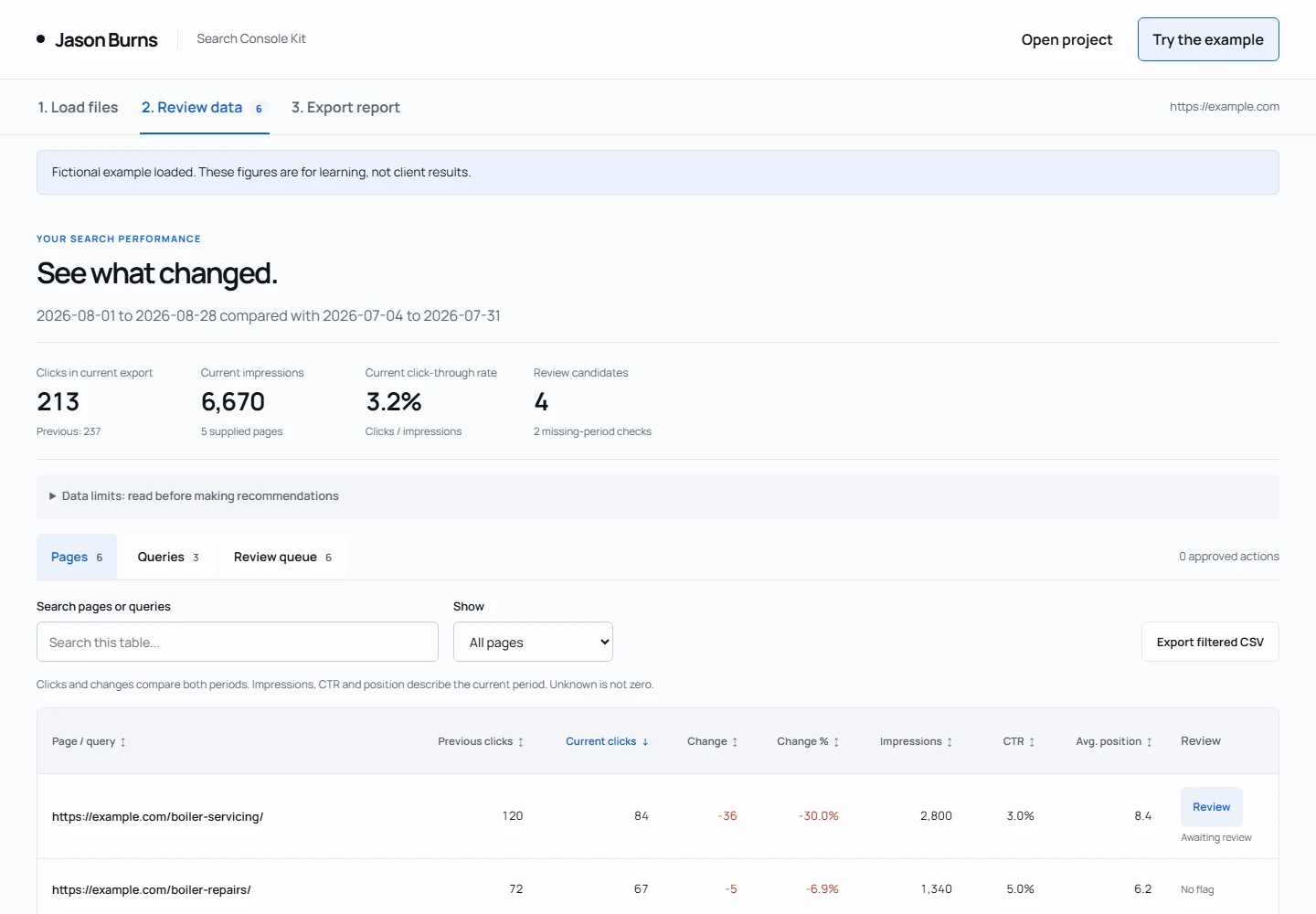
The fictional boiler servicing page lost 36 clicks, a 30% decline. The software shows both rows. It does not claim an algorithm update caused it.
Your next task might be to compare the page's query mix and recorded site changes. Check search intent before choosing an SEO task. Lost search clicks alone do not explain a change in sales or all website traffic.
Read the change, not just the headline
Four metrics.
A better question.
Google Search Console data helps you see what changed in search results. The kit keeps clicks, impressions, CTR and average position together for your review.
In this fictional example, both impressions and click-through rate fell. That gives you two things to investigate. It does not prove the title needs rewriting.
CTR means clicks divided by impressions. A fall from 4% to 3% is one percentage point. Average position is an aggregate, not a fixed keyword ranking.
| Metric | Previous | Current |
|---|---|---|
| Clicks | 120 | 84 |
| Impressions | 3,000 | 2,800 |
| CTR | 4% | 3% |
| Average position | 7.6 | 8.4 |
These figures match the included example CSV files. Your report uses your own exported rows.
CSV files, filters and data limits
Start with the data you already have
Export. Compare.
Review.
Open Google Search Console, then Performance and Search results. Choose a complete date range and export the Pages tab as CSV.
Repeat for an earlier period of the same length. Keep the property, search type, country, device and other filters the same. Import each Pages file separately.
Pages data is the starting point
Each file needs page URLs, clicks, impressions and position. Standard exports also include CTR. The kit checks supplied CTR against clicks and impressions.
Add queries for keyword opportunities
An optional Queries CSV adds search terms and performance figures. Review queries with average positions above 10 and up to 20. Check their value to your client before creating an action.
Keep missing data visible
A page absent from one export is a data gap, not zero clicks. Some queries are withheld for privacy. Exported tables may not contain every row or match the chart totals.
Google explains the metrics and data limits in its Search Console Performance report guide.
Know what you are buying
Useful checks. Clear limits.
| What helps | What still needs your judgement |
|---|---|
| Exact page comparisons with absolute and percentage changes. | A missing row stays unknown. Export limits can hide data. |
| Queries with average positions above 10 and up to 20. | Average position is not a live rank or proof of commercial value. |
| Several pages appearing for the same query. | Requires genuine query-plus-page data. Overlap alone does not prove harmful cannibalisation. |
| Five prompts for evidence review, investigation and client wording. | You check the AI output. An AI subscription is separate and optional. |
| Local software with no automatic uploads. | You save and protect the project files. This is not a hosted dashboard. |
A repeatable consultant workflow
Use it for
your next client review.
The ZIP includes the browser application, five prompts, a guide and fictional CSV examples. Use it on your own sites and client projects.
Extract the ZIP and open START-HERE.html. Try the example before importing your own exports. Use Chrome or Edge on Windows, or Chrome on a Mac.
Version 1.1.0. Up to 10,000 rows and 12 MB per CSV. English numeric formatting. No live Google connection or automatic website changes.
Search Console Client Action Kit
No VAT added. No subscription.
- Local browser application for comparable Search Console CSV exports
- Searchable, sortable page and query tables with filtered CSV exports
- Click-decline, query-opportunity and query-overlap review
- Editable actions, evidence JSON, CSV exports and a printable client report
- Five optional prompts, fictional examples and an export guide
Preview release
The kit is ready for consultant testing before paid launch. Checkout is not open yet.
Ask about trying the kitYou may share resulting reports with clients. Do not resell the software or prompts. Bespoke advice, implementation and ongoing updates are not included. Licence and cancellation terms.
Before you choose
A few practical questions.
Could I do this in a spreadsheet?
Yes. Google Sheets or Excel can compare exports from Google Search Console. The kit gives your analysis a ready-made review flow, saved decisions and evidence attached to each action. If your spreadsheet already does that well, you may not need this software.
Does it connect to the Search Console API?
No. This is an offline CSV analysis tool, not a live SEO dashboard. Export your data manually. Query overlap needs genuine query-and-page rows from your own Search Console API export or another suitable source. Separate Pages and Queries tables cannot establish that relationship.
Which export format should I use?
Use two separate single-period Pages CSV files, not one comparison export. If Google downloads a ZIP, extract it first. You confirm the dates and filters because the Pages rows cannot prove those settings. Optional Dates data can help check daily coverage. The included guide covers column mapping and English number formats.
Do I need ChatGPT?
No. Calculations and exports work without an AI account. The five prompts are optional help with reviewing a finding or writing a brief. Pasting client data into an AI service shares it with that provider. For search intent, outlines and writer handovers, see the SEO Content Brief Prompt Pack.
Does it prove why a page lost clicks?
No. It identifies changes in the supplied exports. You investigate seasonality, page edits, query changes and other possible causes before recommending work.
Can I use it for website migrations?
This kit reviews Search Console performance. For sitemap extraction, URL checks and redirect validation, use the SEO Redirect Toolkit.
Need someone to investigate the site and carry out the work? See SEO management.