
Key takeaways
- On 14 October 2026 NGINX fixed five flaws. F5, the company behind NGINX, rates three of them 9.2 out of 10.
- The fix is nginx 1.30.6 (stable) or 1.31.7 (mainline) or later. For NGINX Plus, 37.0.7.1 or 37.2.0.1 cover all five.
- Two of the three worst flaws only fire with settings you can search for: alias with rewrite, or AIO with Server Side Includes. The third, in recent builds only, is harder to rule out from the config, so update.
- As of 25 October, Ubuntu has no fixed package and Debian 12 is still listed as vulnerable. If you use those packages, check your config and apply the stopgaps.
- I found no reports of attacks, and none of the five is on the US government's list of exploited flaws. That can change once people study the fix.
Status at 12:00 UK time, 25 October 2026. The fixed versions have been out since 14 October. I have found no reports of attacks. Ubuntu has not shipped fixed packages yet. If your site runs on NGINX, check it this week. Need it done for you? Tell me which server.
On 14 October 2026 the NGINX project released nginx 1.30.6 and 1.31.7. They fix five security flaws. F5, the company that owns NGINX, rates three of them 9.2 out of 10 and calls them critical.
In plain terms: someone can send your server a specially built request and crash part of it. On a server where a memory protection called ASLR is switched off or can be got around, F5 says they could run their own code. They do not need a login.
NGINX is very widely used. W3Techs puts it on 30.2% of the websites whose web server it can identify. Laravel Forge sets up servers with it, this site's own server runs it, and it often sits in front of PHP.
That last point is why this follows my PHP2Shell post. They are two different bugs in two different programs, fixed a week apart. A typical WordPress or Laravel server runs both, so it needs both updates.
- VisitorBrowserSends the request
- Web serverNGINXThis post. Fixed 14 Oct in 1.30.6 and 1.31.7
- Runs your codePHPPHP2Shell. Fixed 21 Oct in 8.4.27 and others
- Stores dataDatabaseNot part of either flaw
The short version#
- Check your version. Anything older than 1.30.6 or 1.31.7 has at least one of the bugs. Linux distributions patch older builds under their own numbers, so check their notice too.
- Check your config. Two of the three critical flaws only fire with settings you can search for. The third is harder to rule out. A clean config lowers the risk. It does not remove it.
- Update anyway. Configs change, and old snippets are easy to forget. Updating is the only step that removes the bugs.
What happened, in order#
- nginx 1.30.5 and 1.31.6 fix an earlier HTTP/3 flaw (CVE-2026-90439). That one is not part of this batch, but servers that skipped it are behind twice.
- nginx 1.30.6 and 1.31.7 released with five security fixes. F5 publishes its advisories the same day and rates three flaws 9.2.
- cPanel updates its ea-nginx package source to 1.31.7.
- Singapore's Cyber Security Agency issues an alert: "Patch immediately." nginx 1.31.8 comes out, with no new security fixes.
- Amazon Linux 2023 and Amazon Linux 2 (nginx1 extra) get fixed packages.
- When I checked: Debian 13 fixed, Debian 12 still listed as vulnerable, every Ubuntu release listed as "Needs evaluation", Red Hat's RHEL 8, 9 and 10 listed as affected.
- Plesk Obsidian 18.0.82 is due, with nginx 1.30.6, according to Plesk staff on its forum.
The five flaws, in plain English#
Most of them need a particular setting to be switched on. So you know where to look.
| Flaw | What can go wrong | Only if your config has | F5 score |
|---|---|---|---|
| CVE-2026-15176 | Buffer overflow. Crash, possibly code execution | alias in a location where rewrite changes the address, and $request_filename used in set, return or a log format |
9.2 critical |
| CVE-2026-93479 | Buffer overflow. Crash, possibly code execution | A map with a regex whose captures ($1, $2) are used in root or a log format before the map's own variable. F5 adds a second trigger: a variable that is worked out fresh on every use, inside a string, "under certain conditions" it does not spell out |
9.2 critical |
| CVE-2026-97205 | Freed memory reused. Crash, possibly code execution | aio switched on, and pages that use Server Side Includes with include virtual |
9.2 critical |
| CVE-2026-97629 | A visitor could forge a TLS session and get past a client certificate check | ssl_session_cache shared:... with no ssl_session_ticket_key file, so nginx rotates ticket keys itself |
8.3 high |
| CVE-2026-95101 | Extra data slipped into the request passed to your app, or the upload size limit skipped | HTTP/3 switched on, with request buffering on (the default) | 6.9 medium |
Scroll the table sideways to see every column.
CVE-2026-15176 reaches back to nginx 0.1.29, so old configs are in scope. CVE-2026-93479 only exists in recent builds: 1.30.0 to 1.30.5 and 1.31.2 to 1.31.6. Because of its second trigger, a config search cannot fully clear it. If you are on one of those builds, update.
The TLS session flaw matters if your server checks client certificates, for example on an admin area or an API. F5 says a forged session could bypass that check. Its trigger is an ordinary performance setting, not an unusual feature. F5 rates its impact lower than the three critical flaws.
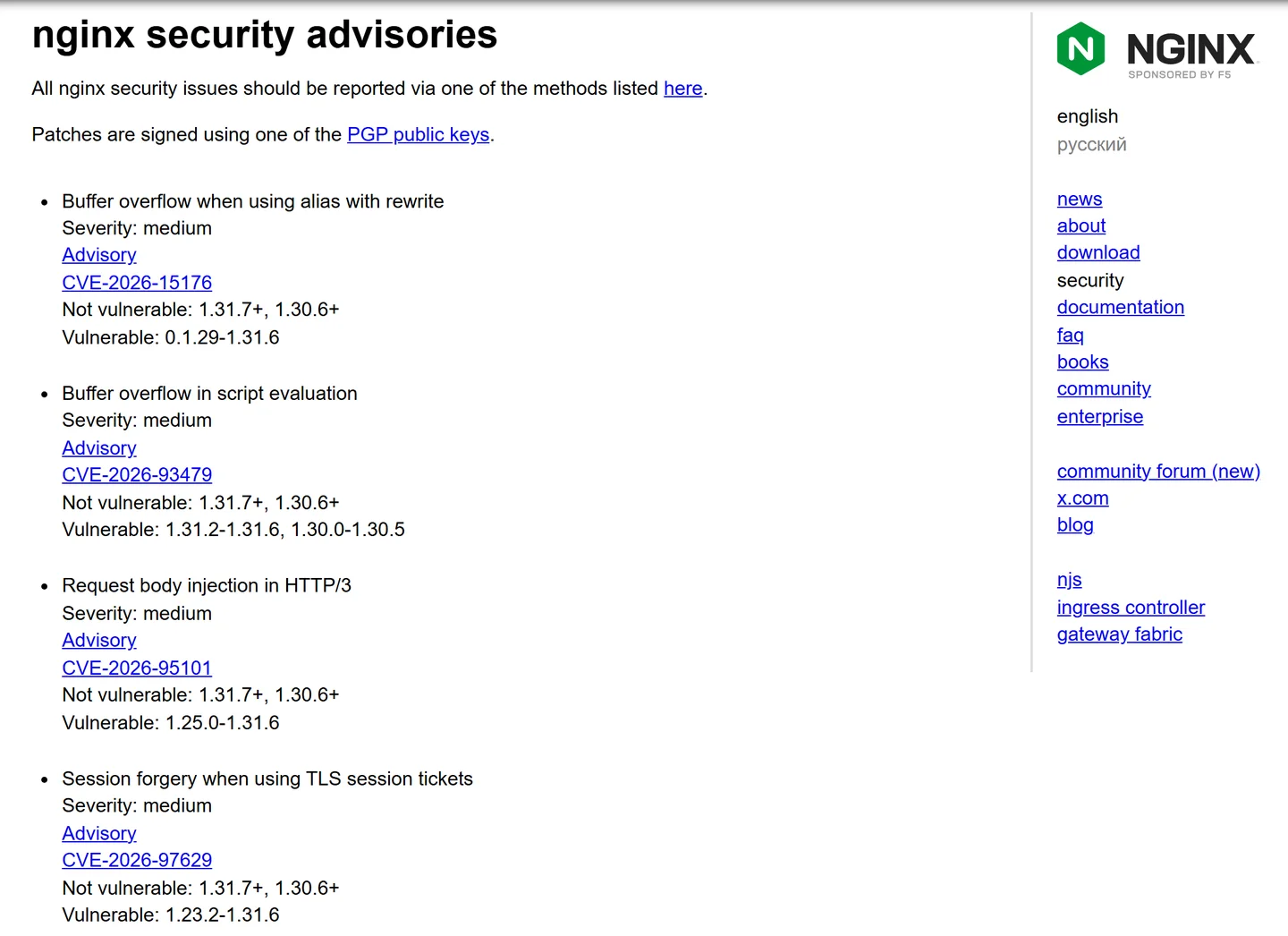
Why "medium" and "9.2 critical" at the same time#
The same bug gets a different score depending on who scores it and how. That confuses people, so here is CVE-2026-15176 as four organisations rate it.
F5 and Red Hat describe the attack the same way. Their numbers differ because CVSS 4.0 and CVSS 3.1 score the same description differently. Amazon gives a lower number because it rates the chance of data being read or changed as none. nginx.org uses its own label.
Red Hat calls the flaw "Important". It says it rates it below F5's 9.2 "because exploitation depends on a specific server configuration".
Code execution also needs ASLR to be off or bypassed. ASLR places memory at random addresses. On this site's Ubuntu server it is set to full randomisation.
So the likely worst case on a well-run server is a worker process that crashes and restarts. That can still knock a busy site over. And it could get worse once people study the fix.
Is anyone attacking this yet?#
I found no report of attacks in the vendor notices and security news I read. CISA's list of known exploited flaws, checked on 25 October 2026 (catalogue version 2026.10.23), contains none of the five and no NGINX entry at all.
That is a good position to patch from. It is not a reason to wait. Once a fix is public, anyone can compare the old and new code to work out how to trigger the bug.
It has also been a heavy year. The nginx.org advisories page lists 26 flaws with 2026 numbers. The previous record on that page was 7, in 2024.
Check whether your server is exposed#
You need a terminal on the server for this. If you are on shared hosting, skip to the hosting section, because your host does it.
Step 1. Find the version.
nginx -v
If it says 1.30.6 or newer on the 1.30 line, or 1.31.7 or newer on the 1.31 line, you have the fixes. If it says something older, read on. On Ubuntu, Debian or RHEL's own packages, an old number can still be patched. Check the package version against your vendor's notice, listed below.
Step 2. Print the whole config and search it. nginx -T prints every file nginx loads, including included ones. That matters, because the risky line is often in a snippet.
umask 077
sudo nginx -T 2>/dev/null > ~/nginx-full.conf

grep -n '\$request_filename' ~/nginx-full.conf      # CVE-2026-15176
grep -nE '^\s*alias\b' ~/nginx-full.conf             # CVE-2026-15176
grep -nE '^\s*map\b' ~/nginx-full.conf               # CVE-2026-93479 (partial check)
grep -nE '^\s*(aio|ssi)\b' ~/nginx-full.conf         # CVE-2026-97205
grep -nE 'ssl_session_(cache|ticket_key|tickets)' ~/nginx-full.conf   # CVE-2026-97629
grep -nE 'listen.*quic|http3' ~/nginx-full.conf      # CVE-2026-95101
Step 3. Read what the matches mean. A hit is not a problem on its own. What matters is the combination:
aliason its own is fine. It is the mix ofalias, arewritein the same location, and$request_filenamethat triggers CVE-2026-15176.- A
mapwithout a regex, or with named captures used only inside its own block, avoids the trigger F5 describes in detail. F5 names a second trigger without the full detail, so on 1.30.0 to 1.30.5 or 1.31.2 to 1.31.6, update even if this looks clean. aiowithout SSI, or SSI withoutaio, is fine.ssl_session_cache shared:...is only a problem when there is nossl_session_ticket_keyline and tickets are not switched off.
Then delete ~/nginx-full.conf. It can contain paths and settings you would rather not leave lying around.
What I found on this site's own server. On 25 October it was running nginx 1.31.3 from the nginx.org repository, with 1.31.8 available. That version is in range for all five flaws.
The config uses alias twice, both for Let's Encrypt certificate checks, with no rewrite and no $request_filename. It has no map, aio, SSI, HTTP/3 or shared session cache. So none of the settings F5 spells out were present. Version 1.31.3 is in range for CVE-2026-93479, whose second trigger F5 does not fully describe, so I updated it anyway. It has run nginx 1.31.8 since 13:55 UK time on 25 October, and every site on it was checked afterwards.
Which version you need#
| You run | Fixed in |
|---|---|
| nginx open source, stable 1.30 | 1.30.6 |
| nginx open source, mainline 1.31 | 1.31.7 (1.31.8 is also fine) |
| nginx 1.28 or older | No release from nginx.org. Move to 1.30.6, or use your Linux vendor's patched package. |
| NGINX Plus 37 | 37.0.7.1 or 37.2.0.1 cover all five. 37.0.5.1 and 37.1.0.1 fix the three critical ones only. R33 to R36 have no fix: move to 37. |
| F5 NGINX Ingress Controller 5 | 5.7.0 |
| NGINX Gateway Fabric 2 | 2.8.0 |
| NGINX Instance Manager 2 | 2.24.0 |
| F5 WAF for NGINX 5 | 5.16.0, or 5.14.2 on the 5.14 line |
| F5 DoS for NGINX 4 | 4.11.0 |
Scroll the table sideways to see every column.
If you cannot update today#
Only the update removes the bugs. These changes, from F5's advisories, close the known trigger for each flaw. They cannot fully cover CVE-2026-93479, so on an affected 1.30 or 1.31 build they are not a substitute for updating. Test the config and reload after each change: sudo nginx -t && sudo systemctl reload nginx.
- CVE-2026-15176: stop using
$request_filenameinset,returnand log formats wherealiasandrewriteare in play. F5 also says to avoidaliasin a location block. Where you can, I would userootinstead. - CVE-2026-93479: use named captures such as
(?<slug>...)instead of$1, and only use them inside the block that holds the regex. - CVE-2026-97205: set
aio off;or switch SSI off. F5 notes that turning AIO off can slow large file downloads under heavy load, and makes little difference to a normal website. - CVE-2026-97629: add
ssl_session_tickets off;, or load a fixed key withssl_session_ticket_key, or remove the shared session cache. - CVE-2026-95101: set
proxy_request_buffering off;on proxied locations that take HTTP/3. If you do not need HTTP/3, switching it off also removes this path.
How to patch it on your hosting#
Shared hosting#
Your host updates nginx, not you. Ask them in writing: "Has the nginx serving my site been updated for CVE-2026-15176, CVE-2026-93479 and CVE-2026-97205, and when?" If your host does not use NGINX at all, they can tell you that too.
cPanel and WHM servers#
cPanel builds its ea-nginx package from the mainline branch. Its public source code moved to 1.31.7 on 15 October and to 1.31.8 on 22 October. A source change is not the same as a released package, so check what your server has. Run your normal system update, then run nginx -v and confirm it shows 1.31.7 or newer.
Plesk servers#
On Plesk's forum on 23 October, Plesk staff said Plesk Obsidian 18.0.82 ships nginx 1.30.6 and will be released on 27 October. They also said a hotfix for 18.0.81 was being worked on. Until then, check your config with the steps above and apply the stopgaps where they match.
Laravel Forge and similar server managers#
These install nginx on your own server, so you patch it. On this site's Forge server, nginx comes from the nginx.org repository. Forge's docs say it applies Ubuntu security updates weekly. On that server, the automatic updates are set to take only Ubuntu's own security updates, so the nginx.org package is never updated by them. That is how it was still on 1.31.3 when 1.31.8 was available.
sudo apt update
sudo apt install --only-upgrade nginx
nginx -v
sudo nginx -t && sudo systemctl restart nginx
Your own Ubuntu or Debian server, with the distro's nginx#
This is the awkward case. As of 25 October 2026:
- Debian 13 (trixie) is fixed by security notice DSA-6575-1, package
1.26.3-3+deb13u10. Runsudo apt update && sudo apt upgrade. - Debian 12 (bookworm) is still listed as vulnerable by Debian's security tracker.
- Ubuntu lists every release, from 14.04 to 26.10, as "Needs evaluation". No fixed package yet.
Until a package arrives, run the config check and apply the stopgaps. The other route is to switch to the nginx.org stable packages (1.30.6). That is a bigger change, and it should be tested before it goes near a live site.
RHEL and its rebuilds#
Red Hat lists the nginx in RHEL 8, 9 and 10 as affected, with a fix being pursued and no update issued yet. Its page also says it has no mitigation that meets its own criteria. So use the config check and stopgaps, and run sudo dnf update nginx when the update lands. AlmaLinux and Rocky publish their own notices, so check theirs.
Amazon Linux#
Fixed packages came out on 24 October for Amazon Linux 2023 (ALAS2023-2026-3263) and Amazon Linux 2's nginx1 extra (ALAS2NGINX1-2026-017). Run sudo dnf update nginx or sudo yum update nginx. Amazon lists no fix planned for the older nginx1.12 extra.
Docker#
The official image has nginx:1.30.6, nginx:1.31.7 and nginx:1.31.8 tags. Rebuild your images with docker build --pull, then recreate the containers. Restarting an old container keeps the old nginx. Check with docker exec <container> nginx -v.
Kubernetes#
There are two different "NGINX ingress" projects, and people mix them up.
- F5's NGINX Ingress Controller is fixed in 5.7.0.
- The community ingress-nginx project. In November 2025 Kubernetes announced that its maintenance would end in March 2026. It said that after that there would be "no further releases, no bugfixes, and no updates to resolve any security vulnerabilities". If you still run it, plan the move off it.
After patching: check it took#
- Run
nginx -vagain, and check the running processes started after the update:ps -o lstart= -C nginx. If they are older, restart nginx. - If you use a control panel, check the version it reports matches.
- Look for crashed workers in the days before you patched.
sudo grep "exited on signal" /var/log/nginx/error.logshows worker processes that died. A few over months can be normal. A cluster on one day is worth a closer look. - If PHP runs behind this nginx, check it has the PHP2Shell fix too.
Get it done for you#
NGINX security fix
I will patch your server and tell you plainly what I found.
- Find which nginx your server really runs, and where it comes from.
- Read the full config for each of the five risky settings.
- Update nginx, or chase your host until they confirm the fix in writing.
- Apply the stopgaps if your vendor has not shipped a fix yet.
- Check PHP on the same server for the PHP2Shell fix while I am there.
- Send you a short written note of what was done.
This site runs on NGINX too. Its server was moved to the fixed nginx 1.31.8 on 25 October. Tell me your site and who hosts it, and I will tell you what it needs and what it costs before I start.
Sources#
Everything above was checked against these pages on 25 October 2026.
- nginx.org security advisories, news, mainline changes and stable 1.30 changes, 14 and 21 October 2026
- F5 advisories, all published 14 October 2026: K000162416 (CVE-2026-15176), K000162607 (CVE-2026-93479), K000162608 (CVE-2026-97205), K000162606 (CVE-2026-97629), K000162613 (CVE-2026-95101)
- Red Hat, CVE-2026-15176, public 14 October 2026
- Debian security tracker, CVE-2026-15176 and DSA-6575-1
- Ubuntu, CVE-2026-15176
- Amazon Linux security centre, CVE-2026-15176
- Cyber Security Agency of Singapore, alert AL-2026-150, 21 October 2026
- CISA Known Exploited Vulnerabilities catalogue, version 2026.10.23
- cPanel ea-nginx commit history
- Plesk forum, ETA for nginx 1.30.6, 23 October 2026
- Laravel Forge docs, automated security updates
- Kubernetes, Ingress NGINX retirement, 11 November 2025
- W3Techs, usage statistics of Nginx
- Docker Hub, official nginx image tags
Frequently asked
Is my website affected by the October 2026 NGINX flaws?
Which nginx versions fix CVE-2026-15176, CVE-2026-93479 and CVE-2026-97205?
Is this the same as the PHP2Shell flaw?
Does Cloudflare protect me from these NGINX flaws?
Can you patch my server for me?