
Key takeaways
- A Search Console report table shows at most 1,000 rows. The API returns up to 25,000 rows per request, and bulk export to BigQuery is the route Google names for the most complete list of queries.
- Compare equal periods with matching filters. A missing export row is not evidence of zero clicks.
- A click decline is an observation. Check the query mix and recorded changes before naming a cause.
- The Search Console Client Action Kit packages this review into local software. The £29 release is in preview and checkout is not open.
Updated What changed on
Fact-checked On 4 November 2026 I opened Google's Performance report guide, its data limitations page, its dimensions page, its API query reference, its bulk export page and the Search Central blog post that launched the 16-month Performance report. I read the kit's price and preview status from the live product page the same day. I did not re-test the software or check its example report beyond confirming it loads.
- Added a short answer, a chart of the three export routes and their row limits, a diagram from export to client action, a sources list and five questions.
- Re-checked the Search Console limits against Google's own pages. Added what Google says about the 1,000-row table, zeros in downloads and anonymised queries.
- Replaced 'Checkout opens after the pilot checks' with what the product page says now: checkout is not open.
A client sends a Search Console export. One service page has lost clicks. They want to know what you will do about it.
Short answer. Use a report's export button for a quick look, but a report table shows at most 1,000 rows. Use the API when you need more, up to 25,000 rows per request. Then compare two equal periods with the same filters, record the dates, and write one task someone can check. A URL missing from one export is missing evidence, not zero clicks.

The percentage change is easy. Choosing a useful task takes more care.
I've built a Search Console Client Action Kit around that decision. It runs from downloaded files in your browser. You load exports, review candidates and write the actions you approve. This first release is ready for consultant testing before paid launch.
- ExportTwo Pages filesEqual-length periods, with the same property, search type and filters
- RecordDates and filtersWritten beside the files, because a Pages CSV does not carry them
- CompareExact URLsA URL in only one file is missing evidence, not zero clicks
- ActOne checkable taskQuery mix and change log first, then a task with a way to verify it
Pick the export that fits the question#
Each route cuts the data off in a different place. Google documents these limits on its own pages.
- Report export. A table in the report can show a maximum of 1,000 rows. Google says some rows may be omitted and points to the API for a larger selection.
- API. The
searchAnalytics.querymethod takes arowLimitfrom 1 to 25,000, with 1,000 as the default. You page on by raisingstartRow. - Bulk export to BigQuery. This is a daily export of your performance data. Google says you see all the performance data available for the property, except anonymised queries.
Anonymised queries are left out of the report table. Google counts them in chart totals unless you apply a query filter. That is one reason a table can add up to less than the chart above it.
Google also says the Performance report keeps daily data in California time. If your other systems use a different time zone, your daily views may not match exactly.
On history, the Performance report holds 16 months of data, as Google announced when it launched the report in January 2018. If a client's baseline is older than that, you can only compare against exports someone saved.
Start with a comparison you can trust#
Choose two periods of equal length. Keep the property, search type and filters the same. Export the Pages table separately for each period.
Record the dates and filters beside your files. A Pages CSV does not give the toolkit enough information to verify those settings for you.
Use complete periods where possible. Check seasonality before treating the earlier period as a fair baseline. Equal length is useful, but it does not make two periods equivalent.
Google explains export options and metric definitions in its Performance report guide. Its data limitations guide explains why some query rows are absent. Your spreadsheet is evidence from an export, not a complete inventory of every search.
Work through one finding#
Here is the fictional boiler servicing example included in the kit.
| Measure | Previous period | Current period |
|---|---|---|
| Clicks | 120 | 84 |
| Impressions | 3,000 | 2,800 |
| CTR | 4% | 3% |
| Average position | 7.6 | 8.4 |
Swipe the table sideways on a phone.
The page lost 36 clicks. That is a 30% decline against the previous 120 clicks. Both impressions and CTR were lower.
Those figures support a finding. They do not identify its cause. They cannot tell you that an algorithm update, a title edit or a competitor caused the change.
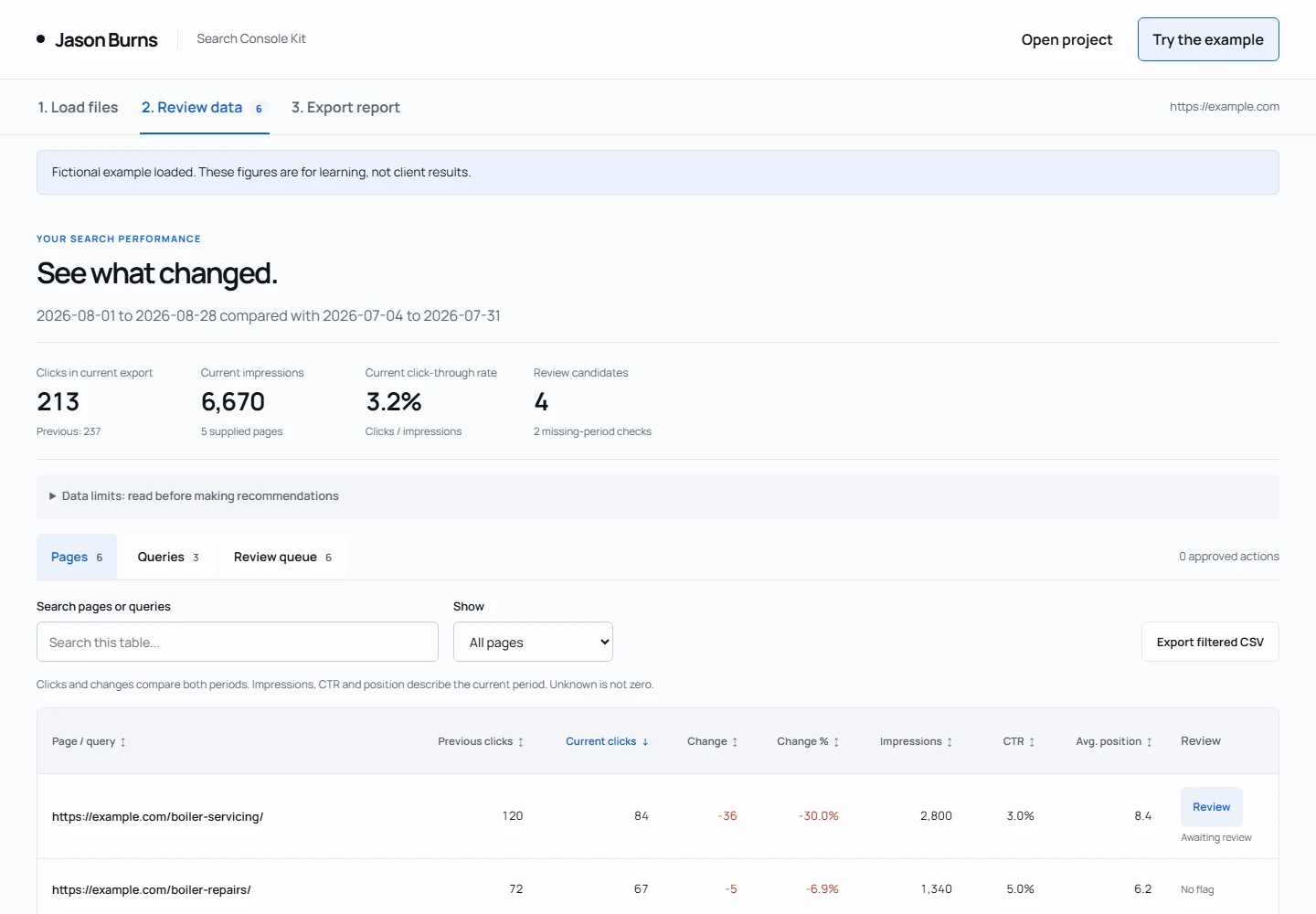
I would first inspect the query mix for this page. Did a useful commercial query lose impressions? Did a large, less relevant query disappear? Then I would compare those observations with the site's change log.
An initial task could read: Compare the boiler servicing query mix with the previous period. Record the largest changes and check the site change log before proposing edits.
That is work someone can carry out and verify. It leaves the cause open until there is enough evidence.
Keep missing data separate from poor performance#
If a URL appears in only one export, do not assign it zero clicks in the other period. It may be new, removed, filtered out or absent because of an export limit.
Google adds a second trap. Values a report shows as a tilde or a hyphen appear as zeros in the downloaded data. So a zero in a CSV is not always a measured zero.
The kit labels a one-sided URL as missing evidence. It leaves the change uncalculated. You can still add an action to check the URL and the source export.
Likewise, two pages appearing for one query do not prove harmful cannibalisation. They may serve different needs. Establishing that overlap requires rows grouped by both query and page. Separate Queries and Pages files cannot establish the relationship by themselves.
What the software contributes#
| Useful part | Limit |
|---|---|
| Compares exact URLs and preserves the source rows | You verify the export dates and filters |
| Flags declines and query opportunities | A flag is not a diagnosis or forecast |
| Saves approved tasks, owners and verification steps | You decide whether the work is worthwhile |
| Exports CSV, evidence JSON and a printable HTML report | You review the report before sharing it |
| Runs locally without automatic uploads | You save and protect the project files |
The kit includes five optional prompts. They cover evidence review, decline investigation, opportunity review, action briefs and client explanations. The calculations work without ChatGPT. Only paste client data into an AI service when you have permission to share it.
You can open the fictional example report before choosing the kit. The product page shows the files, requirements and the £29 one-off price. No VAT is added. Checkout is not open yet, and the page offers a way to ask about trying the kit.
If your task is a migration, the existing SEO Redirect Toolkit covers sitemap URLs, page checks and redirect validation. For ongoing investigation and implementation, see SEO management.
Sources#
All opened on 4 November 2026.
- Google, Performance report (Search results): the export button, and tilde or hyphen values downloading as zeros.
- Google, Search Console data limitations: the 1,000-row table maximum, rare queries, California time.
- Google, Performance report: dimensions and data groupings: anonymised queries and chart totals.
- Google, Search Analytics: query:
rowLimitandstartRow. - Google, About bulk data export to BigQuery: daily export, all data except anonymised queries.
- Google Search Central blog, Introducing the new Search Console, January 2018: "you'll have 16 months of data".
- This site, Search Console Client Action Kit: price, preview status and what the kit includes.
Frequently asked
How many rows can I export from Search Console?
Why do my exported rows not add up to the chart total?
How far back can I export Search Console data?
If a page is missing from one export, did it get zero clicks?
Can I buy the Search Console Client Action Kit now?