
Key takeaways
- I added three UK online businesses through Business Hub and verified each domain with a DNS record.
- Each new profile is saved as a draft. It stays that way until OpenAI approves a separate identity check on the person claiming it.
- Shops and restaurants can currently claim only an existing US listing.
- Claiming does not guarantee increased visibility or control over ChatGPT's recommendations.
On 23 November 2026 I added three UK businesses to ChatGPT's Business Hub. Here are the screens I saw and the limits you should know before submitting. It is a beta, so the screens may have changed by the time you read this.
Short answer. I could add UK online businesses with websites and prove their domains. Each profile is a draft until a separate ID check is approved. Mine were approved the same day. Shops and restaurants can currently claim only existing US listings. Business Agents, the chat assistants that speak for a business inside ChatGPT, are US only.

Who can do this from the UK#
I created profiles for my consultancy and two products I own through HQ Software Ltd: Row HQ, rowing club software, and SailHQ, sailing club software. OpenAI calls Businesses in ChatGPT a beta. Availability depends on location and type.
| What | From the UK today | Where that comes from |
|---|---|---|
| Add an online business | I added three with websites | My run; OpenAI setup guide |
| Claim a shop or restaurant | Existing US listings only | OpenAI setup guide |
| Business Agents | Eligible US ecommerce and online service businesses only | OpenAI announcement |
| Insights: mentions and website clicks | After the ID check is approved | OpenAI setup guide |
| Verified blue check | After Persona approval | OpenAI setup guide |
Swipe the table sideways on a phone.
OpenAI's product page says claiming is initially available to eligible businesses with a website. I do not know if a UK service-area business without one, such as a plumber who travels to customers, can be added.
Before you start#
- Pick the ChatGPT account that will own the listing and become its admin.
- Get access to your domain's DNS settings.
- If you have a limited company, have its Companies House name, number and registered address ready.
- Have photo ID ready for the person completing the check.
- Write a description of 300 characters or fewer.
Only manage a profile if you own the business or are authorised to represent it. OpenAI's policy also prohibits fabricated reviews and unsupported guarantees.
The steps, as I did them#
- Open Business Hub. OpenAI's guide says to open it from the sidebar. I could not find it in the sidebar, Explore or my profile menu. The direct link from OpenAI's announcement worked.
- Use Search business. The page says that by continuing you accept OpenAI's Businesses in ChatGPT Terms. I searched each name and domain. Each search returned 9 or 10 other businesses. The ones with addresses were in the UK, and some showed only a website. None of mine appeared. The first result offered Create followed by what I had typed.
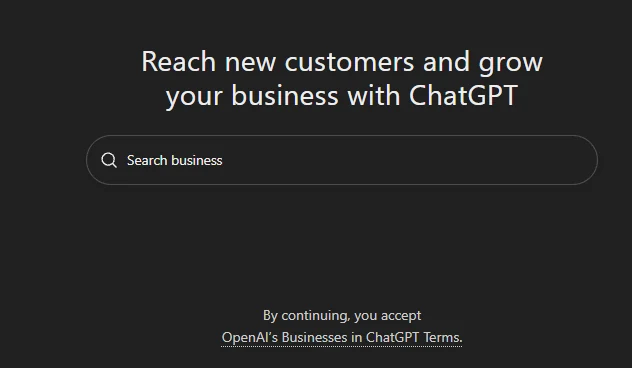
- Select the Create result for your business. If your business is already listed, OpenAI's guide says to select the matching listing, confirm the ChatGPT account that will manage it, then choose one of the verification methods shown. I did not test that route. The guide adds that a listing showing Contact support is locked.
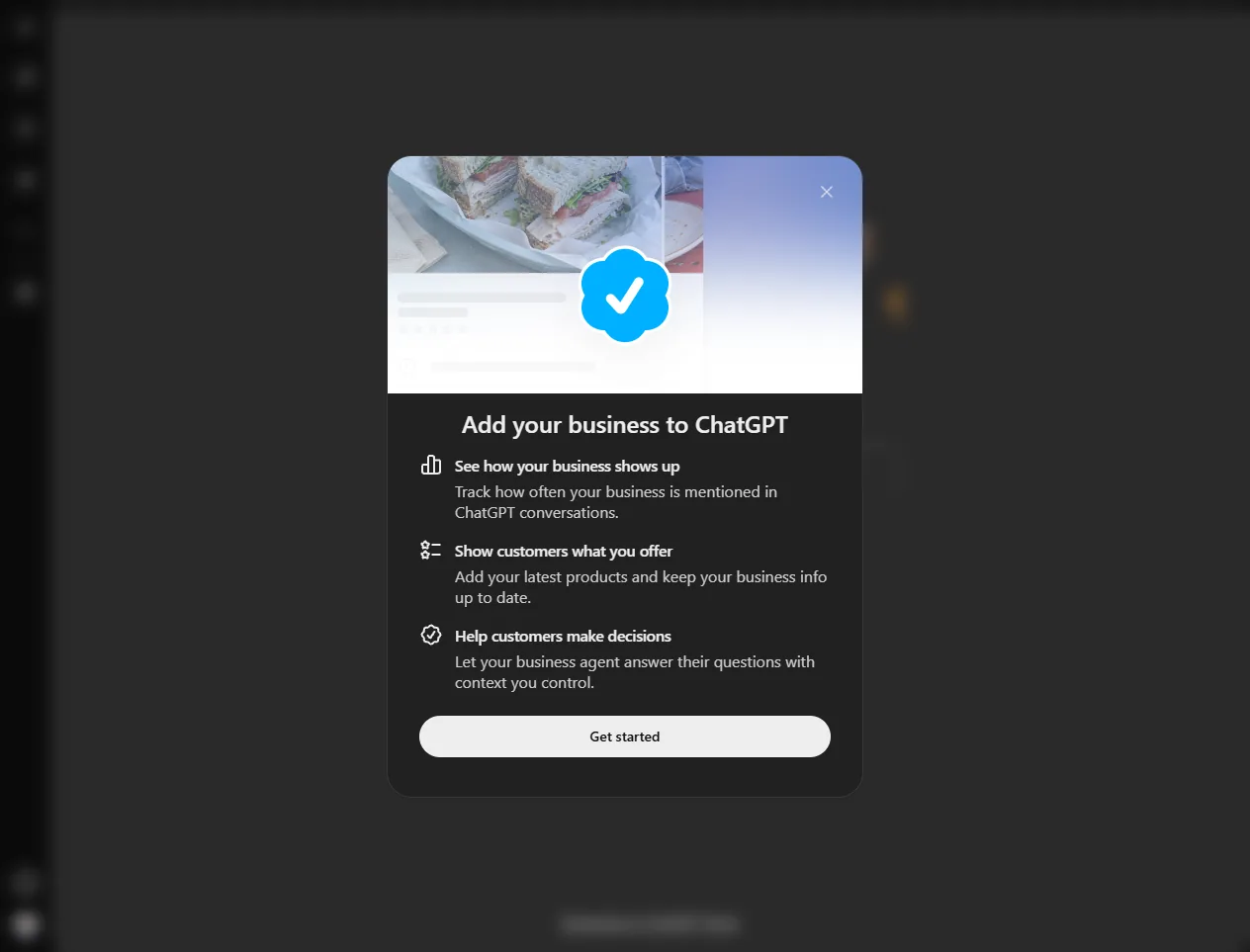
- The first time, I saw Add your business to ChatGPT. I clicked Get started.
- For How do customers usually interact with the business, I chose Through a website each time. The other choice was At a physical location. I was not asked for a street address at this stage.
- Enter your website. The next screen, Verify that you control the domain, asked me to add a TXT record to the domain's DNS settings. DNS settings are where your domain's records are kept, usually at the company you bought the domain from. A TXT record is one line of text added there. I entered the www address for Row HQ and was asked to verify the root domain.
- Add the record and press Verify domain. I used Cloudflare, the company that manages DNS for my domains, with the record set to refresh every 5 minutes. Two public DNS lookups, 1.1.1.1 and 8.8.8.8, showed each record within seconds. Verification passed first time for all three.
- Under Help people get to know the business, choose a category. The list had no SEO category or Marketing consultant. I chose Marketing agency for my consultancy and Software company for both products.
- Fill in More about your business (optional). It stops at 300 characters. My first draft was cut off mid-word without a warning.
- Add contact details if you want. The phone country code began at +1. For a UK mobile, the screen said SMS verification was unavailable and offered WhatsApp or an automated call. Email required a six-digit code sent to that address.
- Answer How do you offer delivery? and What is your return policy? There was no not-applicable choice. For my software products I chose We don't offer delivery and Returns not accepted. Their terms say fees are not refunded. The preview displayed Delivery unavailable and Returns not accepted.
- Press Submit. The confirmation said the profile was saved as a draft and pointed me to the overview. It also offered advertising credit and a ChatGPT Business plan upgrade. I used neither and was not asked to pay.
- Open the overview. Mine showed DRAFT and asked for government-issued ID before editing business information or publishing a business agent. Mentions and website clicks were unavailable. The page offered 7-day and 28-day views.
The DNS record#
Your record has its own code. Copy the value from your screen rather than using the placeholder below.
| Field | What ChatGPT showed |
|---|---|
| Type | TXT |
| Name or host | openai-business-profile |
| Value | openai-business-profile=<your code> |
| Expiry | Date and time, 24 hours after issue |
Swipe the table sideways on a phone.
Many DNS panels add the domain for you, so the name is just openai-business-profile. If yours asks for the full name, add your domain after it.
Do this in one sitting: the code on my screen was set to expire 24 hours after it was issued.
Leave the record in place afterwards. I have left mine. OpenAI's guide tells you to check the record is still there if a later product feed upload fails.
The ID check#
The identity check opened in a window run by Persona, a separate identity-check company that OpenAI uses. It said I might also be asked for a selfie.
The first screen asked for the legal business name, a DBA name, the country and a business type. DBA means Doing Business As, your trading name. It was filled in from the profile name and I could not change it. Type the profile name carefully at the start.
The business type choices were sole proprietor (a sole trader) or entity (a registered company).
For a UK limited company, the entity path asked for a Companies House number: 8 characters, including leading zeros. The form also had a VAT number field, the website (locked), a physical address (no PO boxes) and a legal registered address. A tick box let me use the physical address as the registered address. The photo ID steps came next.
I do not know whether the address given to Persona appears on the public profile. The preview showed no address.
Each profile had its own ID check. I created all three profiles in one afternoon and did the ID checks the same day.
Update, later on 23 November: all three were approved the same day I submitted them. Each profile now shows the blue check. Each insights page now shows mentions and website clicks, where it said Unavailable before. OpenAI's guide says review time varies, so your wait may differ.
After approval I added a logo and a cover photo to each profile. Each image showed "Reviewing your change" after I pressed Save. Stay on the page until it says Saved: two images I left mid-review were not kept.
OpenAI's guide warns that approval automatically publishes a new profile created through Persona. There is no separate publishing step for that profile. Check the wording before continuing.
The VAT field has caught people out. In OpenAI's community forum, at least three users wrote between 11 and 14 November 2026 that the Persona form would not let them continue without a VAT number. One wrote: "My company is not VAT registered so I can't get past that field." Another said an identity check failed and could not be resubmitted. I did not test the sole trader path, so I cannot confirm those reports.
If a check fails, OpenAI's guide says to follow the instructions in its email and to use Try again if it is offered. If you cannot retry, it says to contact OpenAI Support.
What you get, and what you do not#
OpenAI's guide describes aggregate insights over the past 28 days, including mentions and website clicks. You do not receive individual prompts or conversations.
For an online business, a mention counts when ChatGPT references its website. The brand name alone does not count.
A blank metric does not necessarily mean zero. It can mean the reporting threshold has not been reached, data is still being collected or reporting is unavailable.
An OpenAI spokesperson told Digiday that website clicks are "not completed visits or purchases" and that low-volume counts may be withheld for privacy. Check your own analytics too: ChatGPT traffic can show as Direct.
OpenAI's guide says claiming does not guarantee increased visibility or give you direct control over independent recommendations. The product page says claiming does not guarantee higher placement or sales. The guide also says advertising does not influence ChatGPT's independent answers.
OpenAI's Benji Shomair told Digiday that claiming "should not have an impact on how frequently it appears". Digiday also reported him saying the information could help ChatGPT surface a business in more relevant conversations, because it would have a clearer picture of what the business offers.
What the terms sign you up to#
The terms say: "Creating, claiming, or managing your business listing does not give you exclusive control over its contents; OpenAI may supplement, edit, or replace information using other sources or decline to display information you submit." What you type may not be what people see.
They also say: "By using Business Hub, you agree OpenAI's AI assistant may make calls to you on behalf of our users." OpenAI's opt-out page says ChatGPT can call businesses for a user, for example to ask about opening hours or make a reservation. You can opt a phone number out of those calls.
On your basic details, the wording is: "the Display Use license in Section 2.2 is perpetual and irrevocable for basic business information you submit for public display, including business name, address, contact details, category, opening hours, and website." As I read it, you cannot later withdraw permission to display those basic details. I am not a lawyer.
OpenAI's setup guide says only unpublished drafts can be deleted. It says support cannot delete, unpublish or hide a published profile as part of a business setup or ownership request. Check your details before you go through approval.
Read the terms yourself before deciding.
Where ChatGPT gets business details anyway#
OpenAI's search help page says ChatGPT search sometimes partners with other search providers. It links to Microsoft and Shopify privacy policies. It also says location may be shared with trusted third-party providers for local information, without naming those providers. I do not know which providers supply the UK listings already in Business Hub.
BrightLocal, which sells local SEO software, studied business locations in the US, UK and Australia. It reported Yelp as a source in 80% of the ChatGPT answers in its study. Google Business Profile was not a top source for ChatGPT in that study. It does not give a UK-only figure.
Keep your business name, phone, website and address (or the fact that you do not publish one) the same wherever you are listed. See my guide to optimising for ChatGPT and why your site might not show in ChatGPT.
What I would do this week#
- Search Business Hub for your business name and domain.
- Read the terms and decide if you are ready to publish after approval.
- Gather your DNS access and identity details.
- Check your description and contact details before submitting.
- Watch for OpenAI's decision email and check your own analytics.
When to get help#
Ask for help if:
- you cannot access your DNS settings
- you are unsure which business details to use
- you want to know what ChatGPT says about your business
The profile shows mentions only after approval. It does not show what ChatGPT says about you. My £79 AI visibility check answers that. I ask ChatGPT, Google AI Overviews and Perplexity five questions your customers would ask, and compare the answers with up to three competitors. You get a PDF with three priorities.
I do SEO, GEO and AI search consulting, and I fix small business sites. If you need help, get in touch.
Sources#
All opened on 23 November 2026.
- OpenAI, Introducing Businesses in ChatGPT: beta, Business Hub and US Business Agents.
- OpenAI, Setting up your business on ChatGPT: eligibility, verification, publication and insights.
- OpenAI, Businesses in ChatGPT: website eligibility and placement.
- OpenAI, Businesses in ChatGPT Terms: profile information, calls and display licence.
- OpenAI, Businesses in ChatGPT policy: who can manage a profile and content rules.
- OpenAI, Searching the web with ChatGPT: search partners and local information.
- OpenAI, Stop AI phone calls: what the calls are for and how to opt a number out.
- Digiday, Krystal Scanlon, OpenAI's new Business Agents, 10 November 2026: frequency, website clicks and free for now.
- OpenAI community, Introducing Businesses in ChatGPT in beta: individual verification reports.
- BrightLocal, Top sources and directories for local AI search, 26 August 2026: sources in its local search study.
Frequently asked
Can a UK business claim its profile in ChatGPT?
Is it free?
Does claiming make ChatGPT recommend my business more?
What does the ID check ask a UK limited company for?
Can a UK shop or restaurant claim a listing?