
Key takeaways
- Exclude removes your links and content from AI Overviews, AI Mode and generative AI features in Discover together.
- Google says the control does not affect ranking or inclusion elsewhere in Search.
- The UK regulator has given Google until 3 December 2026 to show how many clicks AI features send.
- I am staying included until I can see what AI features send my site.

Google now lets you exclude your site from its generative AI search features. Here is what that choice changes and what I can measure on my own site.
This is a setting for website owners. It does not hide AI Overviews from your own Google searches.
Short answer. For most UK small business sites, I would not opt out yet. Exclude takes you out of AI Overviews, AI Mode and AI features in Discover together. Google says it does not change normal rankings.
You give up any traffic those features send, and Google does not yet show how many clicks that is. UK click data is due by 3 December 2026.

What the control is#
Search Console is Google's free dashboard for site owners. Open Settings, then Search generative AI. The setting covers AI Overviews (the AI summary at the top of some results), AI Mode (Google's chat-style search) and AI features in Discover (the article feed in the Google app).
Google began testing the control with a subset of UK site owners on 3 June 2026. It says the control reached all websites worldwide by 31 August 2026.
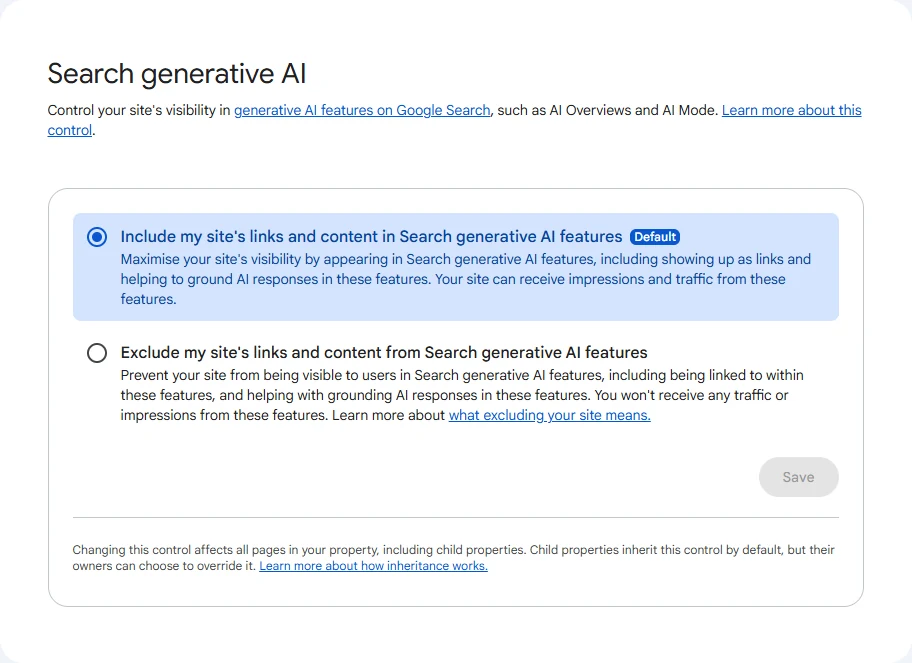
A property is the site, or part of a site, that you manage in Search Console. On the property for my whole domain, I see Include and Exclude choices, with a Save button below. Include is selected and marked Default. It allows my site's links and content to appear in the covered features.
You can also add a property for one folder, which Google calls a URL-prefix property. It follows the whole-site setting unless its owner changes it. A change generally takes a few days to take effect.
What Exclude does#
Google's help page describes Exclude like this: "Your site's content is prevented from being visible to users in Search generative AI features, including being linked to within these features and helping with grounding AI responses in these features. You won't receive any traffic or impressions from these features."
Grounding means using information to support an AI response. Your links and content leave AI Overviews, AI Mode and the generative AI features in Discover together.
Google also says: "Content from other sites will still be available in those features, and it may appear similar to yours." Excluding your site does not stop an answer using similar material from elsewhere.
What it does not do#
Google says: "this control isn't used as a ranking or inclusion signal affecting other parts of Search." Your place in ordinary Search is a separate matter from this choice.
The control does not affect AI training. Google-Extended is a separate setting in your robots.txt file. It covers training of future Gemini models and grounding in the Gemini app and Vertex AI, Google's AI service for developers.
Blocking it does not take you out of AI Overviews. Google's crawler page says it does not affect inclusion in Google Search.
To block content from Google Search completely, Google points to noindex. That is an instruction to keep a page out of Search. It is a much wider choice than excluding it from AI features.
This is a Google setting. It changes nothing in ChatGPT, Perplexity or Copilot.
Why 3 December matters in the UK#
The Competition and Markets Authority (CMA), the UK competition regulator, has imposed a publisher conduct requirement on Google. It requires effective controls over the use of publishers' search content in generative AI and clear, detailed engagement metrics.
The CMA's summary gives Google until 3 December 2026 to comply. It names impressions, clicks and click-through rate, aggregated across search AI features such as AI Overviews and AI Mode. Click-through rate is the share of impressions that lead to a click.
I do not know exactly what Google will publish or whether it will appear outside the UK.
The CMA allows another three months for a page-level control, due 3 March 2027. Its notice also requires directory-level and page-level controls for grounding. It says Google must not penalise publishers for using them, including by downranking them elsewhere in Search.
Digiday reports that the current controls are bundled: you cannot leave one feature and stay in another. The Professional Publishers Association wants the CMA to press Google to split them.
Digiday also reported Candr Media's Chris Dicker saying publishers are holding off until they see click data.
What you can measure today#
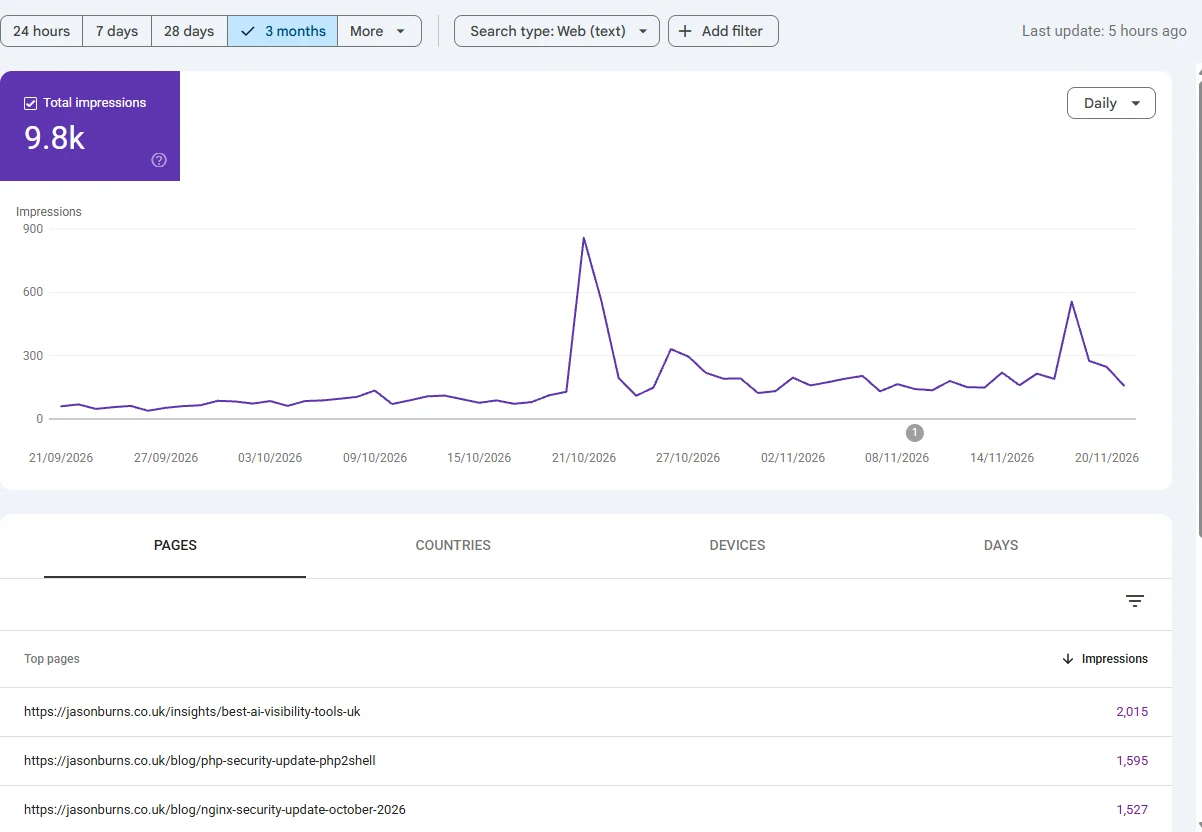
Under Performance, my Generative AI report is labelled Beta. I chose the 3 months view with the search type set to Web (text). My domain property only holds data from 21 September 2026, so the chart starts there.
For 21 September to 21 November 2026 it showed 9.8k impressions. An impression means a link to my site was shown in a generative AI feature on Google Search. The report showed no clicks, click-through rate or queries.
If you see no Generative AI report at all, Google's help page says: "This usually happens when your site hasn't received enough impressions in generative AI features on Google Search." In that case there is little for the setting to change yet.
| Measure | My site, 21 September to 21 November 2026 | Where it is |
|---|---|---|
| AI feature impressions, text searches | 9.8k | Generative AI report |
| All Search impressions (Web) | 60.8k | Search performance report |
| All Search clicks (Web) | 402 | Search performance report |
| Clicks from AI features | Not shown | Not in my report |
Swipe the table sideways on a phone.
My leading pages were my AI visibility tools comparison with 2,015 impressions, my PHP security post with 1,595, my NGINX security post with 1,527, my AI rank trackers comparison with 958 and my GEO cost guide with 597. Each of those is an appearance. I cannot see how many became visits.
The 9.8k is about 16% of my 60.8k Search impressions. It sits inside that total. Google says sites appearing in AI features are "included in the overall search traffic in Search Console" within the "Web" search type. I cannot tell how many of my 402 clicks came from AI features.
Google reports: "A logging error caused a decrease in impressions on the Generative AI performance report in Search for data from November 9 - November 11, 2026. This issue affects data logging only." Treat 9 to 11 November as unreliable in that report.
If you want to appear, see my guide to optimising for AI Overviews. If you are missing, start with why your site is not in AI Overviews. The AI Overviews and AI Mode comparison explains the two features.
What happened to sites that tried it#
Cyrus Shepard at SEO business Zyppy says the site opted out on 1 September 2026. AI-feature impressions fell by more than 99%. Zyppy opted back in on 29 September. He showed an example that still ranked first in regular organic search while the site was excluded.
Shepard says AI impressions had been about 10% of the site's total search impressions. He estimated that AI search sent about 21% of the site's clicks, at a 0.9% click-through rate. Zyppy stayed opted in.
Those are one site's estimates from a before-and-after comparison. Google has published no such figures. For comparison, AI features were about 16% of my own Search impressions.
PPC Land reported SEO consultant Brodie Clark describing a different site. It reportedly lost hundreds of thousands of daily impressions after opting out, while clicks barely moved. The site was not named and the report gave no click figures. This is a second-hand account.
Two sites, two different answers. Neither tells you what will happen to your site or proves that excluding it wins clicks back.
For background, Pew Research Center studied browsing data from 900 US adults in March 2025. Users clicked a traditional result on 8% of visits to a search page with an AI summary, against 15% without one. They clicked a link inside the summary on 1% of those visits.
Pew measured what people do when a summary appears. It did not test a site opting out.
Smaller switches#
A robots meta tag is an instruction in a page's code that tells search engines how to handle it. A snippet is the short text shown under a search result. These choices have different scopes. Read Google's descriptions before changing one.
| Setting | What Google says it does | Scope |
|---|---|---|
nosnippet | Prevents snippets and direct input for AI Overviews and AI Mode. | All forms of search results for the page |
max-snippet | Limits snippet characters and how much content may be direct input for AI Overviews and AI Mode. A value of 0 does the same job as nosnippet | All forms of search results for the page |
data-nosnippet | Keeps marked text out of snippets. Google lists it among the controls for what Search shows from your page. Its specification does not mention direct input for AI Overviews or AI Mode. | Marked parts of a page |
| Search generative AI control | Includes or excludes links and content from the covered generative AI features. | Property, including child properties unless overridden |
Google-Extended | Covers future Gemini model training and grounding in Gemini Apps and Vertex AI. It does not affect Search inclusion. | Whole site or folders, set in robots.txt |
noindex | Blocks content from appearing in Google Search. | Page in Google Search |
Swipe the table sideways on a phone.
How I would decide#
Stay included if:
- AI features show your pages now and you want those mentions.
- You cannot yet measure what those features send you.
- You sell something people research before they choose.
Test excluding if:
- Most of your pages answer a question in one line that an AI Overview can lift whole, though Google can still answer from other sites.
- You have a folder you can test alone with its own URL-prefix property.
- You can compare total clicks before and after.
The first list is my default for a small business. The second is a reason to run a measured test. Nothing here promises that a change will bring visits back.
How to test it without guessing#
- Note your current setting and which property it covers.
- Export the Generative AI report and the normal Search performance report for the last 28 days.
- If you can, add a URL-prefix property for one folder and choose Exclude only for that property.
- Wait a few days for the change to take effect.
- Compare 28 days before with 28 days after, using total clicks and enquiries rather than AI impressions. Do not read anything into AI impressions for 9 to 11 November, the days of Google's logging error.
- Switch back if clicks fall. The setting is reversible.
A before-and-after comparison can show what changed on your site, but it cannot by itself prove the setting caused every change. Keep the exports so you can check the dates and the property you tested.
What I am doing#
My site is set to Include. I have not changed it. I am staying included for now and will look again when the UK click data arrives. I will update this post when Google publishes it.
When to get help#
Ask for help if:
- you are unsure which Search Console property covers a folder
- you want to compare a test with your normal Search clicks
- you want to know what AI answers say about your business
Search Console shows whether AI features display your pages. It does not show what they say about you. My £79 AI visibility check answers that. I ask ChatGPT, Google AI Overviews and Perplexity five questions your customers would ask, and compare the answers with up to three competitors. You get a PDF with three priorities.
I do SEO, GEO and AI search consulting, and I fix small business sites. If you need help, get in touch.
Sources#
All opened on 23 November 2026.
- Google, Search generative AI control: choices, scope, timing and effects.
- Google, New opportunities, control and insights for website owners: rollout dates and testing.
- Google, Generative AI performance report: impressions and report coverage.
- Google, Data anomalies in Search Console: November logging error.
- Google, AI features and your website: AI activity in Web Search totals.
- Google, Robots meta tag specifications: snippet controls and direct input.
- Google, Common crawlers: Google-Extended and Search inclusion.
- CMA, Google search publisher conduct requirement: requirement and links to the summary and notice.
- CMA, publisher conduct requirement summary (PDF), 4 August 2026: deadlines, metrics and protection from downranking.
- CMA, publisher conduct requirement notice (PDF), 3 June 2026: directory and page controls and non-penalisation.
- Cyrus Shepard, Zyppy, We Opted Out of Google AI Search: one site's test and estimates.
- Luis Rijo, PPC Land, Site exits Google AI Overviews and AI Mode, clicks barely move: report of another site's test.
- Jessica Davies and Seb Joseph, Digiday, As publishers await click data: bundled controls and publisher views.
- Pew Research Center, Google users are less likely to click on links when an AI summary appears: US browsing data from 2025.
Frequently asked
Can I opt out of AI Overviews without losing my Google rankings?
Does blocking Google-Extended remove me from AI Overviews?
How long does the opt-out take to work?
Can I leave AI Overviews but stay in AI Mode?
When will Google show clicks from AI features?